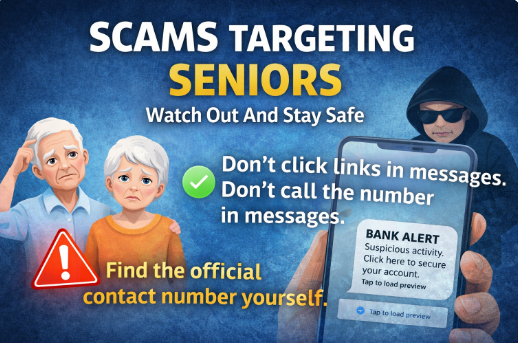
Scams are everywhere in Australia right now, and sadly, older Australians are often targeted because scammers assume seniors are more likely to trust official-looking messages or feel pressured to act quickly. The most important thing to remember is this:
If a message makes you feel rushed, worried, embarrassed, or panicked, that’s a sign you should slow down.
Scammers don’t win because people are silly — they win because they’re very good at creating urgency and confusion, often pretending to be organisations you already know and trust. Scamwatch warns that scammers can even make calls and texts appear to come from your bank or other legitimate organisations.
Why scams are especially dangerous for seniors
Scams can cause more than financial loss. They can lead to:
- Money being transferred out of your account
- Identity theft (your personal details used to open accounts, take loans, or commit fraud)
- Access to important online services like myGov being taken over
- Stress, worry, and loss of confidence using technology
Government agencies warn that scammers commonly try to steal details like myGov logins, Medicare/Centrelink details, and banking information.
The most common scams seniors see in Australia
These are some of the frequent ones I see (and that Scamwatch and government sites regularly warn about):
Text message scams (smishing)
A text claims to be from:
- A delivery company (parcel problem)
- Your bank (suspicious transaction)
- myGov / Centrelink / Medicare (account locked, refund due, identity check)
These often include a link and an urgent message designed to get you to click. Scamwatch specifically warns that scam texts often look like they’re from government, businesses you deal with, or even family and friends.
Email scams (phishing)
These can look very convincing and may include logos, official wording, and threats like “your account will be suspended”. Scamwatch’s guidance is clear: don’t click links in unexpected emails/texts.
Phone call scams (spoofed numbers and “vishing”)
Scammers may call pretending to be:
- A bank
- Telstra / NBN / “internet support”
- The ATO
- A government department
They may even appear to call from a legitimate number (spoofing).
Remote access scams
Someone claims they need to “help fix” your computer, then asks you to install software so they can control it. The Australian Cyber Security Centre warns against responding to requests to download software or allow remote access.
The golden rules to avoid being scammed
1) Don’t click links in texts or emails
Even if the message looks real. Even if it uses a company logo. Even if it appears in a thread you’ve received genuine messages in before.
Scamwatch and cyber.gov.au both advise: don’t click links, don’t open attachments, and don’t reply to unexpected requests.
2) Don’t call the phone number in the message either
This is a big one, and it catches a lot of people.
Some scams are designed so that if you don’t click the link, you’ll call the number instead — and that number goes straight to the scammer.
What to do instead (safe method):
- Open your internet browser and search for the organisation (e.g., “Commonwealth Bank contact number” or “ATO phone number”)
- Go to the official website (or use the number printed on your bank card/statement)
- Call the official number and ask, “Did you send me this message?”
This “find the number yourself” approach is exactly the kind of verification government cyber advice recommends: use official sources and trusted contact details, not what’s provided in an unexpected message.
3) Slow down: scammers want you to panic
Scam texts and emails often say things like:
- “Final warning”
- “Your account will be closed today”
- “Suspicious transaction — act now”
- “You must verify immediately”
That emotional jolt is the trap. Take a breath, pause, and verify independently.
4) Never share these details by email, text, or phone
Be extra cautious if someone asks for:
- Passwords or one-time codes
- Banking logins
- myGov login details
- Remote access to your computer
- Copies/photos of ID
If someone is pressuring you to give any of the above, end the call.
A simple “Stop, Check, Protect” process
If you receive a message and you’re unsure, do this:
Stop
- Don’t click anything
- Don’t call numbers in the message
- Don’t reply
Check
- Is it unexpected?
- Is it urgent or threatening?
- Does it ask you to log in, pay money, or confirm details?
- Verify by finding the official contact details yourself and calling the organisation directly
Protect
- Delete the message
- Block the sender if possible
- If you think you’ve interacted with it, take action immediately (below)
If you think you’ve been scammed (or you clicked)
First: don’t be embarrassed. It happens to good, careful people every day.
Do these steps straight away
- Contact your bank immediately if money has been sent or you entered card details (the sooner the better).
- Change passwords for any account you think may be affected (email first, then banking/myGov).
- If it relates to myGov/Centrelink/Medicare, follow Services Australia / myGov scam guidance and contact their help channels for scams and identity theft support.
- Report the scam to Scamwatch (it helps warn others and track patterns).
- If it’s a cybercrime incident, consider reporting via ReportCyber .
- If personal details were handed over, IDCARE can help with identity and response steps (Scamwatch regularly points people there).
A quick word for families helping parents
If you help a parent with technology, encourage one simple habit:
- If a message claims to be from a bank/government/service provider, they should check with you first before clicking anything.
A two-minute phone call to a family member can prevent weeks of stress.
Need a hand?
If you’re on the Sunshine Coast and you’d like help setting up safer habits (password manager, scam call handling, safer email setup, checking devices for suspicious apps), that’s exactly the sort of practical, calm support I provide.
Senior Tech Assist
Need help: 0435 415 873

I started this service after seeing how many older Australians struggle with technology — not because they can’t learn it, but because no one takes the time to explain it properly. With more than 20 years’ experience in digital technology and online training, I wanted to create something patient, local, and genuinely helpful.